Building Bridges: How to Create a Community Resource Page
Building Bridges: How to Create a Community Resource Page
November 21, 2025
Hello friends!
Every community has people looking for support, as well as those who are willing to help. Whether they are looking for mental health support or services, local food banks, youth programs, or housing information, access to reliable information can impact someone's life. That’s where a community resource page comes in.
Creating a community resource page isn’t about putting a bunch of links together, but about extending care and support through collecting resources. This is also a way to show how your community looks out for one another, making it easier for people to find the support they need and for helpers to reach those who need them the most.
Access to reliable information transforms lives. When people know where to turn for help, they feel empowered instead of overwhelmed. This resource page aims to encourage early intervention, but to let people know there is care, compassion, and connection in their community.
Steps to Create Your Own Resource Page:
- Define Your Purpose and Audience:
Before designing anything, ask yourself these questions:
- “Who is this page for?” or “Who will use the resource page?” Would it be for students, parents, residents, or small businesses?
- What kind of resources does your community need most? (Healthcare resources, housing information, education, youth programs)
Knowing your audience will guide the type of information you include, but with a focused purpose, you ensure every link you add allows organizations to serve the community better.
- Research and Collect Reliable Resources:
A good resource page is strong, as long as it has valid resource content that’s available. Start compiling information from trusted organizations such as local nonprofits, government programs, and community centers.
For this, you would also want to find information about the resource’s phone, address, and hours of operation.
Feel free to include statewide and national resources, especially if there are hotlines available for an individual to use.
- Organize by Category:
After collecting your list of reliable resources, start by organizing your resources into clear categories, such as:
- Health and wellness
- Food assistance
- Housing support
- Community programs
- Youth Programs
- Design for Accessibility:
Designing a layout for the community can be a hard task to take on; however, a clean, easy-to-read layout encourages visitors to stay and explore. Here are a few design tips:
- Use clear headings and short descriptions for each resource
- Include clickable links and contact information
- Ensure your page is mobile-friendly or computer-friendly
- Use large texts and readable fonts for inclusivity
- Make it Collaborative:
Reach out to your community for input! Please feel free to reach out to your own local organizations and ask them for their feedback to see if any other resources would be helpful to include!
Example:
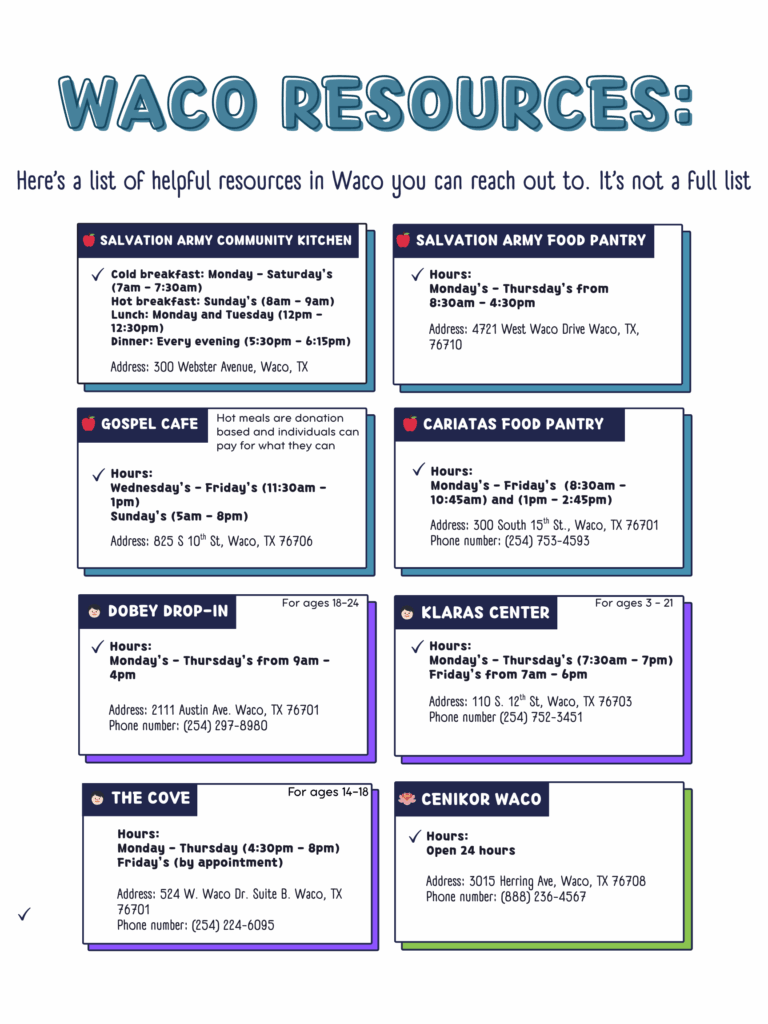
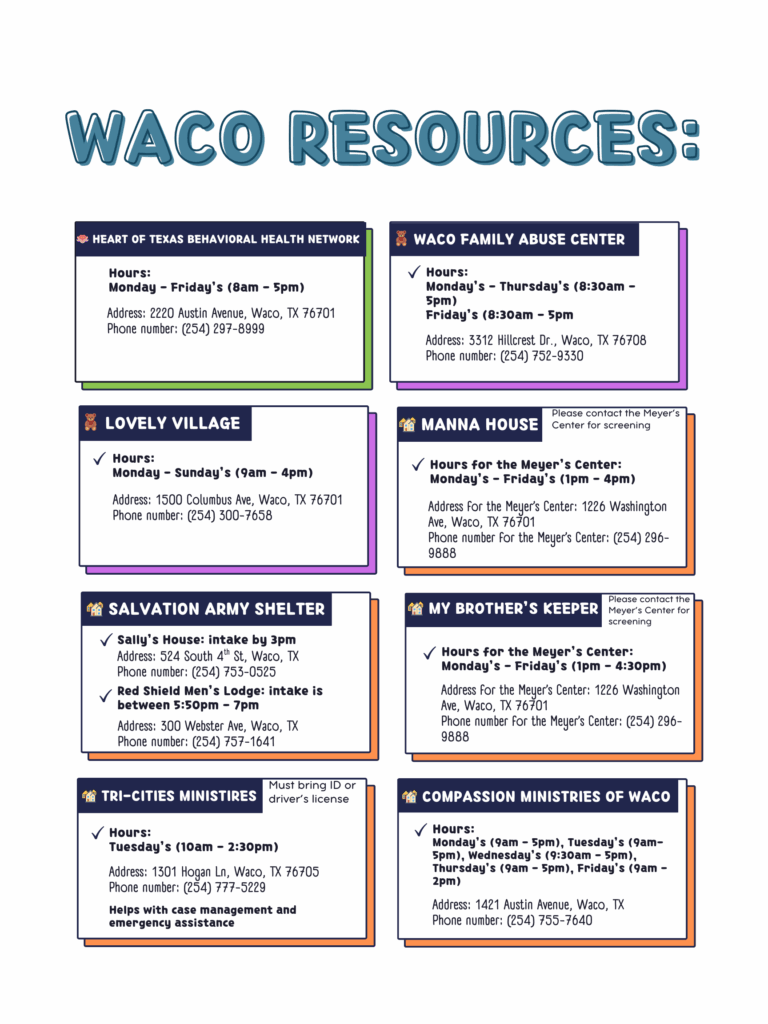
Below is an example of what a resource page looks like for people who live in the Waco community:
Why it Matters:
A community resource page goes beyond a collection of links. Instead, it serves as a map to endless possibilities of resources that can meet needs. Taking the time to organize your community’s local resources in an accessible way connects your neighbors with the hope and support that can impact their lives for the better.